Hardware protocol & SDK reference
Hotel guestroom Modbus RS485 integration — protocol maps, SDK notes and gateway references for developers.
Note: PurePoint Smart is a guestroom RCU and smart panel hardware manufacturer, focused on volume supply and OEM/ODM. This page is an optional protocol integration / secondary development reference for integrators or customers building their own software — not a PurePoint Smart core product.
Hardware ready — open protocol integration
We deliver stable RCU, panel and module production plus Modbus / MQTT protocol docs and sample code so integrators can implement scene logic on their own platforms. PurePoint Smart handles hardware definition and manufacturing; application software, PMS and cloud platforms are built by partners or third parties.
import org.eclipse.paho.client.mqttv3.persist.MemoryPersistence;
public class MqttClientDemo {
public static void main(String[] args) {
String broker = "tcp://127.0.0.1:1883";
String clientId = "JavaClient";
String pub_topic = "hotel/light/control";
String sub_topic = "hotel/light/status";
String content = "Smart lighting control";
int qos = 1;
try {
MemoryPersistence persistence = new MemoryPersistence();
MqttConnectOptions connOpts = new MqttConnectOptions();
MqttClient client = new MqttClient(broker, clientId, persistence);
client.connect(connOpts);
MqttMessage message = new MqttMessage(content.getBytes());
message.setQos(qos);
client.publish(pub_topic, message);
System.out.println("Message published");
client.subscribe(sub_topic, qos);
System.out.println("Subscribed to topic: " + sub_topic);
} catch (MqttException e) {
e.printStackTrace();
}
}
}
MQTTClient_message message = MQTTClient_message_initializer;
message.payload = payload;
message.payloadlen = strlen(payload);
message.qos = QOS;
message.retained = 0;
MQTTClient_deliveryToken token;
MQTTClient_publishMessage(client, topic, &message, &token);
MQTTClient_waitForCompletion(client, token, TIMEOUT);
printf('Send `%s` to topic `%s` ', payload, PUB_TOPIC);
}
msg_count = 0
while not FLAG_EXIT:
msg_dict = {
'type': 'info'
}
msg = json.dumps(msg_dict)
if not client.is_connected():
logging.error('publish: MQTT client is not connected!')
time.sleep(1)
continue
result = client.publish(PUB_TOPIC, msg)
status = result[0]
if status == 0:
print(f'Send `{msg}` to topic `{PUB_TOPIC}`')
else:
print(f'Failed to send message to topic {PUB_TOPIC}')
msg_count += 1
time.sleep(1)
qos := 0
msgCount := 0
for {
payload := `{'type':'info'}`
if token := client.Publish(pub_topic, byte(qos), false, payload); token.Wait() && token.Error() != nil {
fmt.Printf('publish failed, topic: %s, payload: %s', pub_topic, payload)
} else {
fmt.Printf('publish success, topic: %s, payload: %s', pub_topic, payload)
}
msgCount++
time.Sleep(time.Second * 1)
}
}
console.log(`${protocol}: Connected`)
client.subscribe(sub_topic, { qos }, (error) => {
if (error) {
console.log('subscribe error:', error)
return
}
console.log(`${protocol}: Subscribe to topic '${sub_topic}'`)
client.publish(pub_topic, payload, { qos }, (error) => {
if (error) {
console.error(error)
}
})
})
})
{
int msg_count = 0;
while (true)
{
System.Threading.Thread.Sleep(1*1000);
string msg = '{'type':'info'}';
client.Publish(topic, System.Text.Encoding.UTF8.GetBytes(msg));
Console.WriteLine('Send `{0}` to topic `{1}`', msg, topic);
msg_count++;
}
}
'type' => 'info'
);
$jsonp = json_encode($payload);
$mqtt->publish(
$jsonp,
0,
true
);
printf('msg send $jsonp to $pub_topic');
$mqtt->subscribe($sub_topic, function ($topic, $message) {
printf('Received message on topic [%s]: %s', $topic, $message);
}, 0);
Built for software developers
with capable IoT smart devices

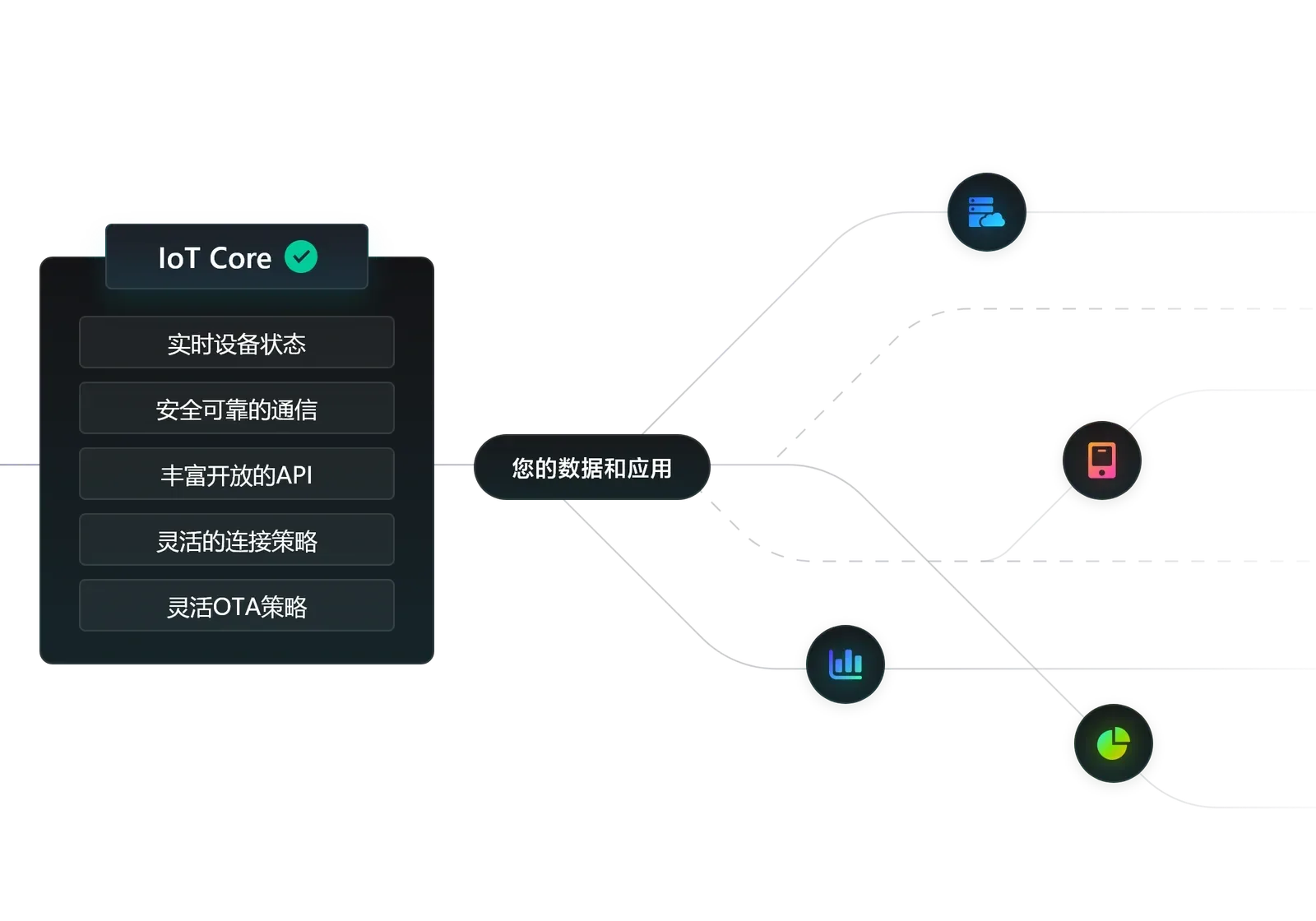
PurePoint Smart opens all device capabilities so developers can build applications for more IoT scenarios and unlock greater IoT potential.

Across chip-based designs, PurePoint Smart maintains a unified communication protocol — all support MQTT and TCP.

Each device gets region-specific versions to meet local standards and requirements, with dedicated tooling and assembly.

OEM available from 1,000 units per batch to customer specs; contact PurePoint Smart for ODM requirements.
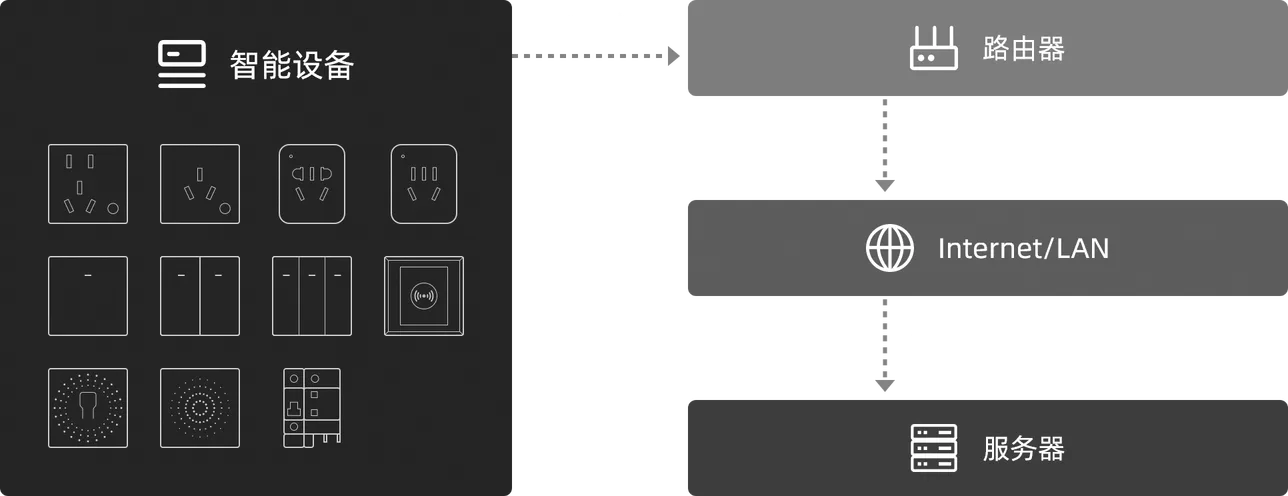
With WiFi smart devices, deploy servers on LAN or cloud. Devices use MQTT pub/sub or TCP listen modes to exchange data — suited to concentrated deployments.
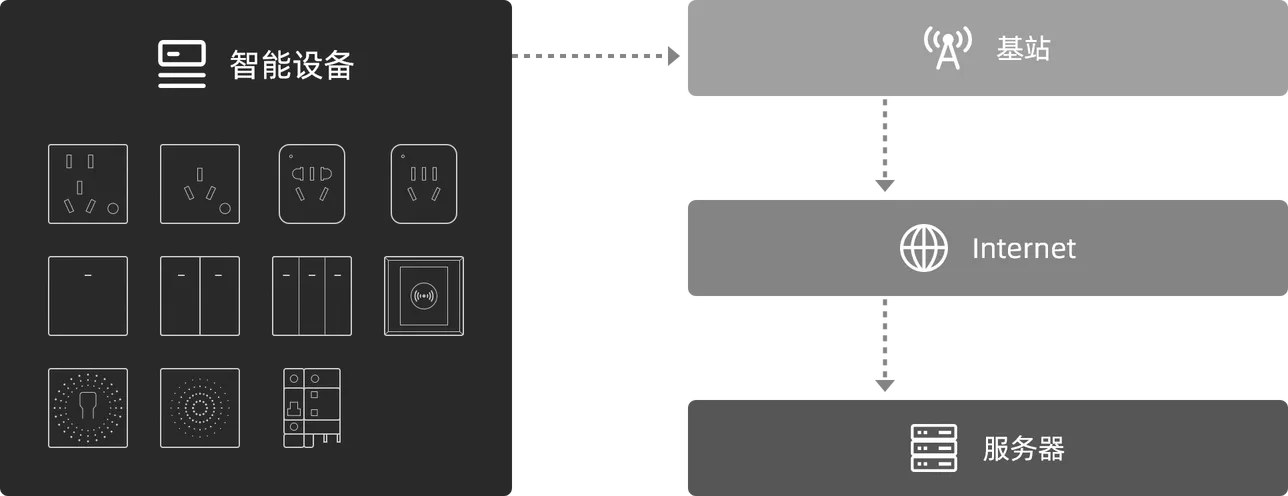
With 4G devices, servers must be cloud-hosted. Devices use MQTT pub/sub or TCP listen for data exchange — suited to dispersed deployments.
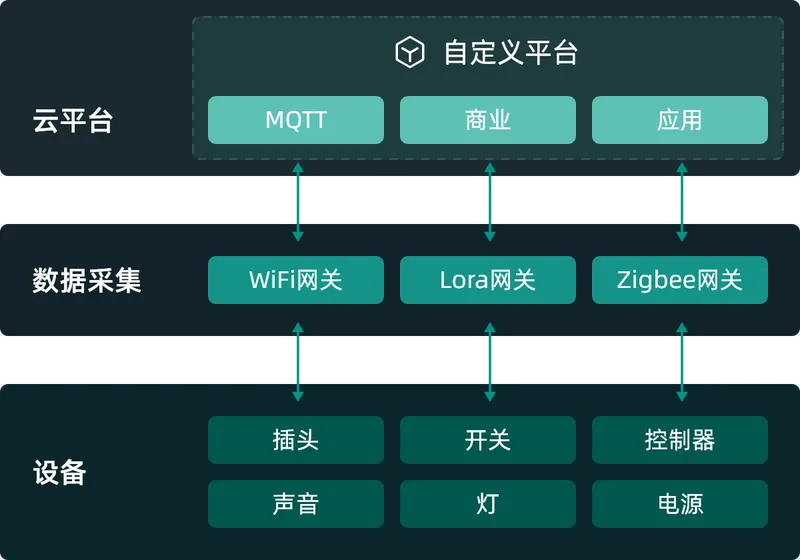
Connect PurePoint Smart devices via standard MQTT — reliable, efficient and secure to start your IoT business.
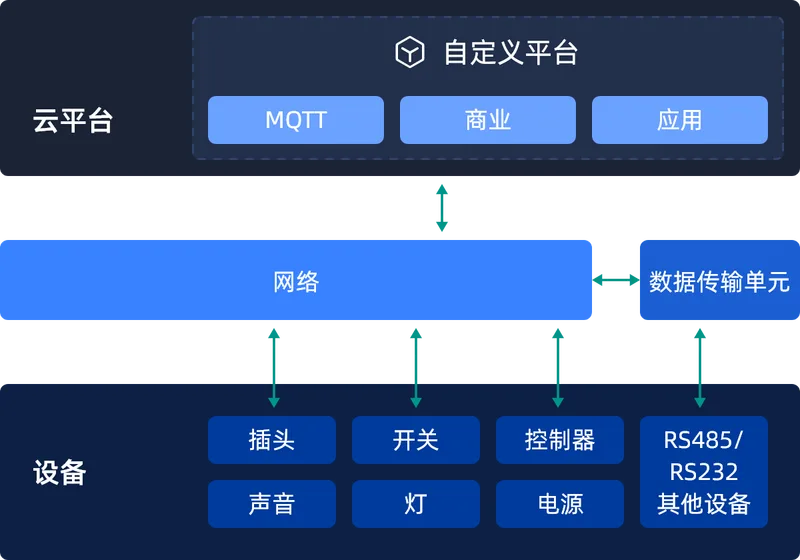
Custom TCP Server with TCP protocol to extend existing networks alongside other devices.
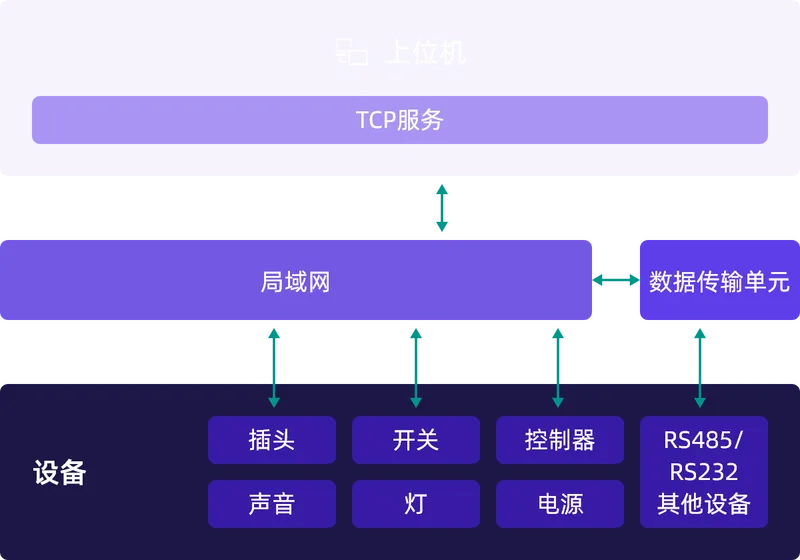
Configure PurePoint Smart devices as TCP host; use SCADA tools to collect data and control devices directly.

Power on/off control
Publish MQTT topic messages or send via TCP Server to client
"type":"event",
"key":1
}
"type":"Socket-mini",
"key":1,
"wifiLock":0,
"keyLock":0,
"ip":"192.168.0.101"
}

Energy query
Query real-time voltage, current and cumulative energy for load monitoring
"type":"statistic"
}
"voltage": 226.024,
"current": 15.027,
"power": 2921.511,
"energy": 25.047
}

WiFi provisioning lock
Lock device WiFi config to prevent on-site misconfiguration
"type":"setting",
"wifiLock":1
}
"type":"Socket-mini",
"key":1,
"wifiLock":1,
"keyLock":0,
"ip":"192.168.0.101"
}

Function key lock
Lock device function keys to prevent long-press factory reset on site
"type":"setting",
"keyLock":1
}
"type":"Socket-mini",
"key":1,
"wifiLock":1,
"keyLock":1,
"ip":"192.168.0.101"
}

Status query
Current device status including MAC address, WiFi name and more
"type":"info"
}
"mac":"Socket-mini",
"type":"Socket-mini",
"version":"2.0.0",
"key":1,
"wifiLock":1,
"keyLock":1,
"ip":"192.168.0.101",
"ssid":"open-wifi"
}
Connect phone or PC to device hotspot hc-xxxxxxxx, password: Aa123456.
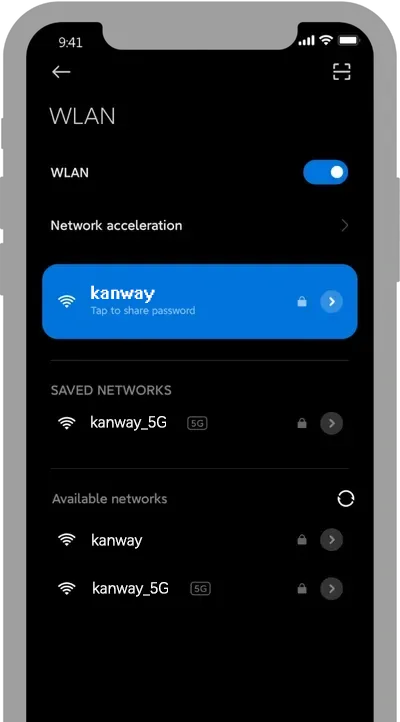
After connection, the provisioning page opens automatically (or browse to 192.168.4.1).
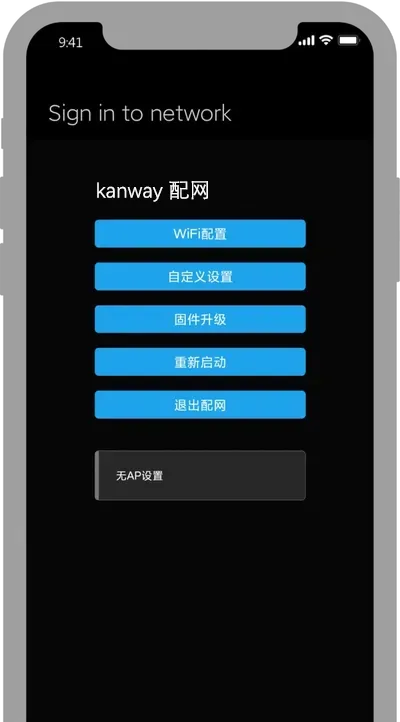
Tap WiFi config, select the network (refresh to rescan), enter password and save.
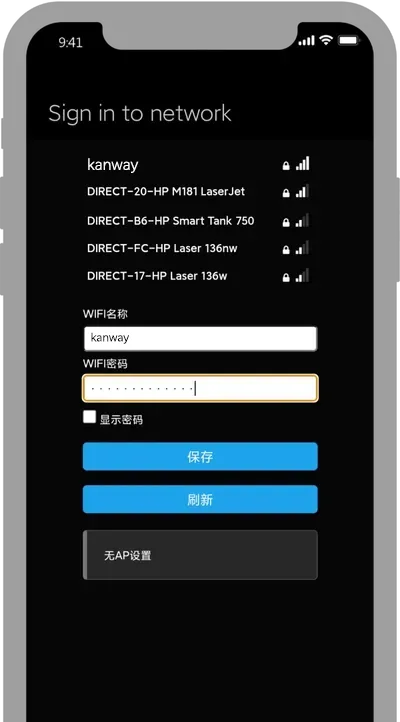
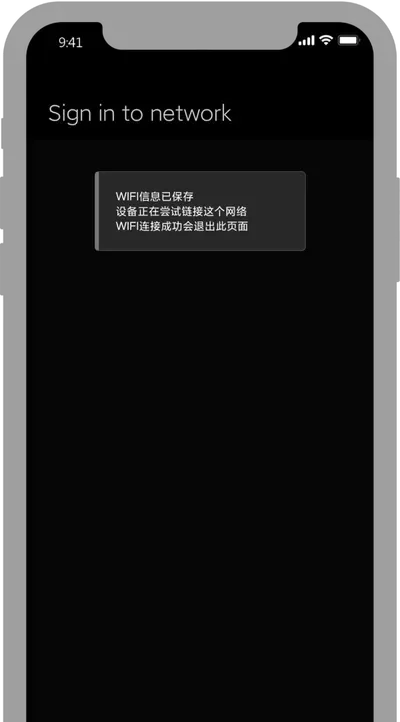
With correct password, tap Save — provisioning validates WiFi and completes setup.

Need hardware BOM or wiring manuals?
Browse the product catalog and engineering docs; developer API for system integration.